
九保すこひです(フリーランスのITコンサルタント、エンジニア)
さてさて、実は前回記事「社外秘データも使える生成AI。OllamaでLinuxコマンド提案ツールをつくってみた!」でお話を伺った社長さんからもう1つ面白そうなキーワードを教えてもらたんです。
それが・・・・・・
ベクトルDB
です。
ベクトルDBとは、通常DBとは違って、意味を数値化して保存するデータベースです。そして、その数値(ベクトル)で検索するため、あいまいな条件でも特定のデータを探すことができるようになっています。
そして、なぜその社長さんがベクトルDBに注目しているかというと、
大企業は「あのファイルどこだっけ?」で時間がかかりすぎる
から解決できるのでは、と考えているからとのことでした。
つまり、ChatGPTのように自然言語をつかって、たとえば、
- 来月出すのに適切な報告書がどれ?
- 1年前もらったの見積書はどれ?
- 議事録のフォーマットはどれが適切?
というようなファイル検索につかえたら、とのことでした(面白い視点ですよね😊)
そこで!
(不勉強ながら)ベクトルDBはまったく知らなかったので、前回記事でつかったOllama(ローカルLLM)をつかって、「オフラインで完結する(=社外秘データOKな)」ファイルのあいまい検索をつくってみました!
以下のような方に向けて書いています。
ぜひ最後まで読んでくださいね!
- 「社外秘データを生成AIでつかいたい」
- 「クラウドに上げられない顧客データを安全に検索・要約させたい」
- 「取引先との契約書を、部署横断で一瞬で検索できるようにしたい」
- 「過去の稟議書・企画書から似た事例をすぐ引っ張り出したい」
- 「属人性をなくして、『あの人しか知らない』をなくしたい」
- 「退職した人のフォルダの中身も検索できるようにしたい」
- 「とにかく、AIの流れを逃したくない!」

「今年も早かった。
どうせまた『え!後3日で2026年もおわり!?』
てなるんでしょうね😂」
前提として
サーバーで実行することを前提としているので、今回は実装環境はUbuntu(Linux)になります。ただし、技術的にはwindowsやmacOSでもいけると思うので、ぜひ参考にしてください!
ちなみに、ローカルで実装するなら基本的にはすべて無料でいけますよ👍
必要なテクノロジーを準備する
今回の「あいまい検索」を実装するには、以下5つのテクノロジーが必要です。
- Ollama:ローカルLLM(ローカルで動くAI)
- Qdrant:ベクトルDB(データを数値で管理するデータベース)
- PDF to Text:画像からテキストを抽出するOCR
- MySQL:通常のDB(インストールは割愛)
- ウェブ開発:LaravelやVueなど(インストールは割愛)
それぞれインストールしておきましょう!
Ollama(ローカルLLM)をインストールする
前回記事「ベクトルDB + ローカルLLMで見積書のあいまい検索をつくってみた!」では、gemma2:2bというモデルを使いましたが、今回はベクトル化専用のモデル「embeddinggemma:300m」をインストールします。
※どうやらEmbeddingGemmaは、Googleが提供してるようですね🤔
以下コマンドを実行します。
ollama pull embeddinggemma:300m
これでインストールは完了です。
Qdrant(ベクトルDB)をインストールする
dockerがつかえるので、以下コマンドでインストールします。
※ちなみにですが、読み方は「クワドラント」だそうです。
docker pull qdrant/qdrant
インストールが完了したら、以下コマンドで起動します。
docker run -p 6333:6333 -v $(pwd)/qdrant_storage:/qdrant/storage qdrant/qdrant
この状態で「http://localhost:6333/」が有効になってるので、ブラウザからアクセスできます!一度見てみましょう。

後で紹介しますが、データの保存&検索はこのURLを使うことになります。
では、普通のDBのテーブルにあたる「コレクション」を「estimate_documents」という名前でつくっておきます。
curl -X PUT "http://localhost:6333/collections/estimate_documents" \
  -H 'Content-Type: application/json' \
  -d '{
    "vectors": {
      "size": 768,
      "distance": "Cosine"
    }
  }'
以下のように返ってくれば成功です。
{"result":true,"status":"ok","time":0.041063127}
ではダッシュボードがあるので、「http://localhost:6333/dashboard#/collections」にアクセスしてみます。
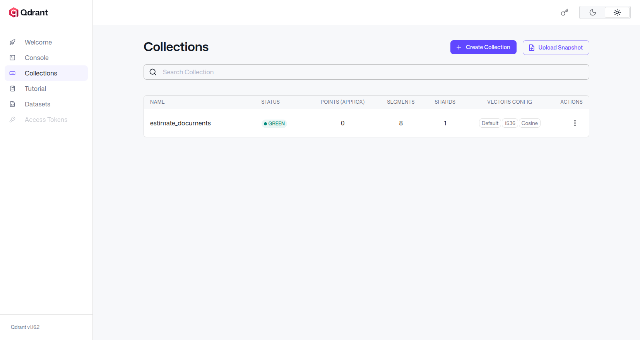
こんな感じで表示されていれば成功です!
実装する流れ
いくつか必要なテクノロジーがあるので、ここでどんな流れで「あいまい検索」するかまとめておきましょう。
まず、手順としては、
- あいまい検索したい見積もりPDFを用意する
- pdfのファイル名などをMySQLへ保存
- PDFからテキストを抽出し、Ollamaで整形&ベクトル化
- Qdrantに3のベクトルデータ&追加情報として2のidを一緒に保存
次に検索の場合は、
- 検索したいキーワードを用意
- Ollamaを使ってキーワードをベクトル化
- Qdrantで検索して、追加情報の(MySQLでつかう)IDを取得
- そのIDをつかってMySQLからデータ取得
- ユーザーに表示する
となります。
では、ここからはLaravelで実装していきましょう!
Laravelの部分をつくる
ここからウェブアプリをつくっていきます。
実際のコードはこちらになります。
※各解説は省略しますが、もしわからないところがあれが、こちらからChatGPTにでも聞いてください。
routes/web.php
use App\Http\Controllers\FuzzySearchController;

Route::prefix('fuzzy-search')->group(function () {
    Route::get('/', [FuzzySearchController::class, 'index'])->name('fuzzy-search.index');
    Route::get('/create', [FuzzySearchController::class, 'create'])->name('fuzzy-search.create');
    Route::post('/', [FuzzySearchController::class, 'store'])->name('fuzzy-search.store');
});
app/Http/Controllers/FuzzySearchController.php
<?php

namespace App\Http\Controllers;

use Illuminate\Http\Request;
use Illuminate\Support\Facades\Storage;
use App\Models\EstimateDocument;
use Illuminate\Support\Facades\Http;

class FuzzySearchController extends Controller
{
    public function index(Request $request)
    {
        $keyword = $request->query('q', '');
        $results = [];

        if ($request->filled('q')) {
            $embedding = $this->getEmbeddingFromOllama($keyword);
            if (is_array($embedding) && count($embedding)) {
                try {
                    $url = 'http://127.0.0.1:6333/collections/estimate_documents/points/search';
                    $response = Http::timeout(10)->post($url, [
                        'vector' => $embedding,
                        'limit' => 10,
//                        'score_threshold' => 0.7, // このスコア(類似度)以上のものだけ返す。でもテストなのでコメントアウト
                        'with_payload' => true,
                    ]);

                    if ($response->ok()) {
                        $body = $response->json();
                        $vectorItems = $body['result'] ?? [];
                        $vectorCollection = collect($vectorItems);
                        $estimateDocumentIds = $vectorCollection->pluck('id')->toArray();
                        $estimateDocuments = EstimateDocument::whereIn('id', $estimateDocumentIds)->get();

                        // ヒット順に結果を作る(scoreを付与)
                        foreach ($estimateDocumentIds as $estimateDocumentId) {
                            $estimateDocument = $estimateDocuments->firstWhere('id', $estimateDocumentId);
                            if(! is_null($estimateDocument)) {
                                $results[] = [
                                    'id' => $estimateDocument->id,
                                    'filename' => $estimateDocument->filename,
                                    'original_filename' => $estimateDocument->original_filename,
                                    'path' => $estimateDocument->path,
                                    'score' => $vectorCollection->firstWhere('id', $estimateDocumentId)['score'],
                                ];
                            }
                        }
                    }
                } catch (\Exception $e) {
                    throw $e;
                }
            }
        }

        return inertia('FuzzySearch/Index', [
            'q' => $keyword,
            'estimateDocuments' => $results,
        ]);
    }

    public function create(Request $request)
    {
        $success = $request->session()->get('success');

        return inertia('FuzzySearch/Create', [
            'flash' => $success,
        ]);
    }

    public function store(Request $request)
    {
        // バリデーションやトランザクションは省略しています

        $file = $request->file('pdf');
        $path = $file->store('public/estimates');
        $filename = basename($path);

        // 1. MySQLにファイル名 & 元のファイル名を保存
        $doc = $this->saveEstimateDocument($filename, $file->getClientOriginalName());

        // 2. PDFからテキストを抽出
        $localPdf = Storage::path($path);
        $extractedText = $this->extractPdfText($localPdf);

        // 3. テキストをベクトル化
        $embedding = $this->getEmbeddingFromOllama($extractedText);

        // 4. Qdrantへ保存
        if (is_array($embedding) && count($embedding)) {
            $this->saveEmbeddingToQdrant($doc, $embedding);
        }

        return redirect()->route('fuzzy-search.create')->with('success', '処理が完了しました。');
    }

    private function saveEstimateDocument(string $filename, string $originalFilename): EstimateDocument
    {
        return EstimateDocument::create([
            'filename' => $filename,
            'original_filename' => $originalFilename,
        ]);
    }

    /**
     * OllamaのAPIに問い合わせを行う
     */
    private function askOllama(string $prompt): ?array
    {
        try {

            $url = 'http://127.0.0.1:11434/api/generate';
            $response = Http::timeout(10)->post($url, [
                'model' => 'gemma2:2b',
                'stream' => false,
                'prompt' => $prompt,
            ]);

            return $response->json();

        } catch (\Exception $e) {

            throw $e;

        }
    }

    /**
     * pdftotextコマンドを使ってPDFからテキストを抽出する
     */
    private function extractPdfText(string $localPdf): string
    {
        $commands = [
            sprintf('pdftotext -layout -enc UTF-8 %s -', escapeshellarg($localPdf)),
            sprintf('pdftotext -layout %s -', escapeshellarg($localPdf)),
            sprintf('pdftotext %s -', escapeshellarg($localPdf)),
        ];

        foreach ($commands as $command) {
            $out = [];
            $ret = 1;
            exec($command, $out, $ret);
            if ($ret === 0) { // 成功したら返す
                $prompt = "これは見積書テキストです。明細行の品名だけ抜き出し、配列としてJSONだけで出力してください\n\n" . implode("\n", $out);
                $answer = $this->askOllama($prompt);
                $text = $answer['response'] ?? '';

                $start = strpos($text, '[');
                $end   = strrpos($text, ']');

                if ($start === false || $end === false || $end < $start) {

                    throw new \RuntimeException('JSON 配列が見つかりませんでした。');

                }

                $json = substr($text, $start, $end - $start + 1);
                $data = json_decode($json, true);

                if (json_last_error() !== JSON_ERROR_NONE) {
                    throw new \RuntimeException('JSON デコード失敗: ' . json_last_error_msg());
                }

                return implode("\n", $data);
            }
        }

        return '';
    }

    /**
     * OllamaのAPIを使って、埋め込みベクトルを取得する
     */
    private function getEmbeddingFromOllama(string $text): ?array
    {
        if (trim($text) === '') {
            return null;
        }

        try {
            $url = 'http://127.0.0.1:11434/api/embed';
            $response = Http::timeout(10)->post($url, [
                'model' => 'embeddinggemma:300m',
                'input' => $text,
            ]);

            if (! $response->ok()) {
                return null;
            }

            $body = $response->json();
            return data_get($body, 'embeddings.0');
        } catch (\Exception $e) {
            return null;
        }
    }

    private function saveEmbeddingToQdrant(EstimateDocument $doc, array $embedding): void
    {
        try {
            $url = 'http://127.0.0.1:6333';
            $point = [
                'id' => $doc->id,
                'vector' => $embedding,
                'payload' => [
                    'estimate_id' => $doc->id,
                ],
            ];

            Http::put(
                $url . '/collections/estimate_documents/points?wait=true',
                [
                    'points' => [$point],
                ]
            );
        } catch (\Exception $e) {
            throw $e;
        }
    }
}
resources/js/Pages/FuzzySearch/Index.vue
<template>
    <Head title="見積書 あいまい検索" />

    <div class="mx-auto max-w-3xl p-6">
        <h1 class="mb-4 text-2xl font-semibold">見積書を自然言語であいまい検索</h1>

        <form @submit.prevent="onSubmit" class="mb-4 flex">
            <input
                v-model="form.q"
                type="text"
                placeholder="検索語を入力"
                class="flex-1 rounded-l border p-2"
            />
            <button
                type="submit"
                :disabled="loading"
                class="rounded-r bg-indigo-600 px-4 py-2 text-white disabled:opacity-60"
            >
                <span>{{ loading ? '検索中...' : '検索' }}</span>
            </button>
        </form>

        <div class="overflow-hidden rounded bg-white shadow">
            <table class="w-full text-sm">
                <thead class="bg-gray-50">
                    <tr>
                        <th class="p-3 text-left">ID</th>
                        <th class="p-3 text-left">ファイル名</th>
                        <th class="p-3 text-left">
                            類似度
                        </th>
                        <th class="p-3 text-left">ファイルの場所</th>
                    </tr>
                </thead>
                <tbody>
                    <tr
                        v-for="estimateDocument in estimateDocuments"
                        :key="estimateDocument.id"
                        class="border-t"
                    >
                        <td class="p-3" v-text="estimateDocument.id"></td>
                        <td
                            class="p-3"
                            v-text="estimateDocument.original_filename"
                        ></td>
                        <td
                            class="p-3"
                            v-text="estimateDocument.score.toFixed(4)"
                        ></td>
                        <td class="p-3">
                            <input type="text" class="w-full text-xs" :value="estimateDocument.path" />
                        </td>
                    </tr>
                    <tr v-if="estimateDocuments.length === 0">
                        <td class="p-3" colspan="4">
                            見積書は見つかりません。
                        </td>
                    </tr>
                </tbody>
            </table>
        </div>
    </div>
</template>

<script setup lang="ts">
import { Head, useForm } from '@inertiajs/vue3';
import { ref } from 'vue';

interface EstimateDocument {
    id: number;
    filename: string;
    original_filename: string;
    path: string;
    score: number;
}

const props = withDefaults(
    defineProps<{
        q?: string;
        estimateDocuments?: EstimateDocument[];
    }>(),
    {
        estimateDocuments: () => [],
    },
);

const form = useForm<{
    q: string | undefined;
}>({
    q: props.q,
});

const loading = ref(false);

const onSubmit = () => {
    loading.value = true;
    form.get(route('fuzzy-search.index'), {
        preserveState: true,
        onFinish: () => {
            loading.value = false;
        },
    });
};
</script>
app/Models/EstimateDocument.php
<?php

namespace App\Models;

use Illuminate\Database\Eloquent\Model;
use Illuminate\Support\Facades\Storage;

class EstimateDocument extends Model
{
    protected $fillable = [
        'filename',
        'original_filename',
    ];

    public function getPathAttribute(): string
    {
        return Storage::path('public/estimates/' . $this->filename);
    }
}
database/migrations/****_**_**_******_create_estimate_documents_table.php
<?php

use Illuminate\Database\Migrations\Migration;
use Illuminate\Database\Schema\Blueprint;
use Illuminate\Support\Facades\Schema;

return new class extends Migration
{
    public function up()
    {
        Schema::create('estimate_documents', function (Blueprint $table) {
            $table->id();
            $table->string('filename');
            $table->string('original_filename');
            $table->timestamps();
        });
    }

    public function down()
    {
        Schema::dropIfExists('estimate_documents');
    }
};
テストしてみる
では、OllamaとQdrantを起動して、まずは以下のデータを含む見積書をPDFでつくって検証してみます!
IT開発作業:test-1.pdf
| 作業内容 | 数量 | 単価 | 金額 |
|---|---|---|---|
| システム設計作成 | 1 | 12,345 | 12,345 |
| フロントエンド実装 | 1 | 12,345 | 12,345 |
| データベース構築作業 | 1 | 12,345 | 12,345 |
| API開発・連携 | 1 | 12,345 | 12,345 |
| UIデザイン調整 | 1 | 12,345 | 12,345 |
保守・運用作業:test-2.pdf
| 作業内容 | 数量 | 単価 | 金額 |
|---|---|---|---|
| サーバー保守点検 | 1 | 12,345 | 12,345 |
| バックアップ運用 | 1 | 12,345 | 12,345 |
| 障害対応・復旧作業 | 1 | 12,345 | 12,345 |
| セキュリティ監視 | 1 | 12,345 | 12,345 |
| システムアップデート | 1 | 12,345 | 12,345 |
コンサルティング作業:test-3.pdf
| 作業内容 | 数量 | 単価 | 金額 |
|---|---|---|---|
| 導入コンサルティング | 1 | 12,345 | 12,345 |
| セキュリティ診断 | 1 | 12,345 | 12,345 |
| 業務改善提案書作成 | 1 | 12,345 | 12,345 |
| クラウド移行支援 | 1 | 12,345 | 12,345 |
| 研修・教育実施 | 1 | 12,345 | 12,345 |
では、ブラウザで「https://l12x-vue.test/fuzzy-search/create」にアクセスして、3つのPDFをアップロードします。
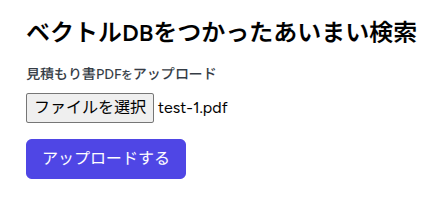
アップロードが完了したら、Qdrantで確認してみましょう。
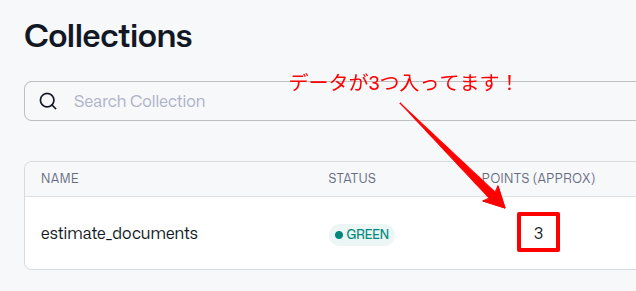
はい!
通常DBのレコードにあたる「ポイント」が3つになってます。
ひとまずは成功です👍
では次に、メインのあいまい検索ですね。
「https://l12x-vue.test/fuzzy-search」にアクセスして、まずは「コンサルに関係する見積書を見つけて」で検索してみましょう。
どうなるでしょうか・・・・・・
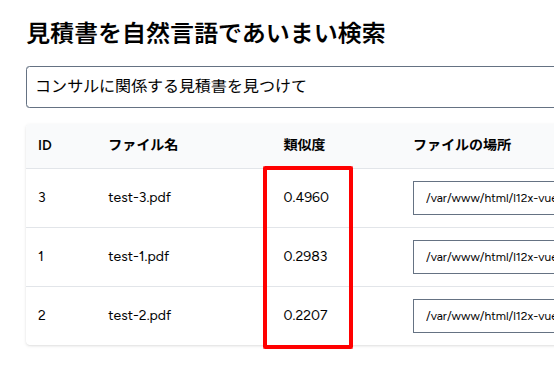
はい!「導入コンサルティング」が含まれているtest-3.pdfがハイスコアになりましたね。
では、次は逆に全く関連がない「野菜に関係する見積書を見つけて」で検索してみます。
うまくいくでしょうか・・・・・・
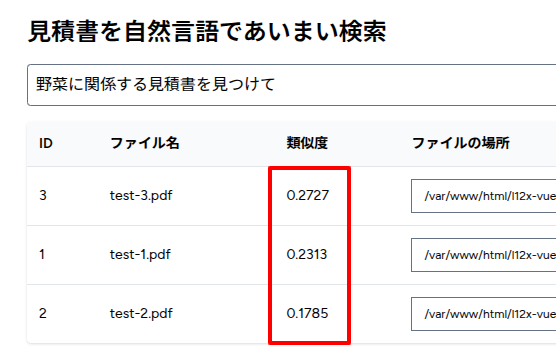
はい!すべてのスコアが低くなりました。
こっちも成功ですね😊✨
※ちなみに
今回は検証したデータ数が少なかったり、軽量のAIモデルをつかっているため、全パターンに対応できるわけではないと考えてます。
はやり、この辺はトライ&エラーで改善していくしかなさそうですね。
もしChatGPTとかをオンプレミスで使えれば、グンッと精度は向上するとおもうんですけどね🤔
企業様へのご提案
今回のように、ベクトルDB + ローカルLLMをつかうと「インターネットに重要なデータを出さずに」ChatGPTのようなことができます。
もちろん精度は叶わないとは思いますが、Ollamaなどのモデルでもある程度の対応はできますし、もしパソコンのスペックが許すなら、精度も高めることができるでしょう。
もし「ChatGPTで業務効率化したいけど、社外秘データだから…」という状況にあるようでしたら、何かお力になれるかもしれません。
ぜひお問い合わせからご相談ください。
お待ちしております😊✨
おわりに
ということで、今回は「ベクトルDB + ローカルLLM」で見積書のあいまい検索をしてみました。
正直なところ、初めはPDFを画像化し、それをTesseract(OCR)でテキスト抽出するようにしてたのですが、精度が悪くうまくいきませんでした。
※特に、枠線が入っていると違う文字と認識してしまうようですね😅
次に、pdftotextでテキストを抜き出すようにしましたが、これも見積書PDF全体をベクトル化していたので、精度がまったく出ず、見積書の明細だけを抜き出すようにしました。
やはり、こういうシステムって少しずつ工夫をしてブラッシュアップする必要があり、また、そこが面白かったりするところですね。
最後に、今回はいわゆるバイブコーディング(GitHub Copilotのエージェントモード)でプログラムをつくってみましたが、正直まだ満足できるものではなかったですね…。
※サジェストモードはバリバリ使ってますよ!
まずAIがつくったコードを読んでいると「いや、ここはこうでしょ!」と追加で命令しますが、勝手に新しいフォルダやファイルつくったり、1行で済むところを10行以上で実装したりと可読性を無視したコードばかりでした。
でも、表面上(ブラウザ上)はうまくいっているように見えるため、クライアントさんにちゃんと我々の価値を理解してもらう努力も必要になってくると思ってます(特に保守性やセキュリティが必要性を理解してもらいやすいかもですね)
…となると、むしろ今後は「私はエージェントモードではプログラムを書きません!」ってゆってる人の方が価値が高くなることもあるんでしょうか🤔依頼主からすると「だったらセキュリティも、保守性もちゃんとしてるよね」とか。
AIがもっと進歩すれば話は別ですが・・・
シンギュラリティ、来るなら早くしてって気分です(笑)
ではでは〜!

「みなさん、2025年も
お世話になりました!
よいお年を👍」